


SySOPik
-
Posts
591 -
Joined
-
Last visited
-
Days Won
4
Content Type
Profiles
Forums
Gallery
Downloads
Blogs
Events
Everything posted by SySOPik
-
Hello everyone. A good option has appeared in routers - DNS-based routes. But, many previous versions of routers are used, which are still quite good (kn-3010, 1711, 1311, 1111) and replacing them all at once is problematic. Will this option be implemented in firmware version 4.x.x?
-
The problem occurs periodically. Usually it either connects to all or none. I can provide you with service numbers, but there are a lot of routers, do I need to list them all? The problem usually occurs from a mobile phone on the road, from home, from the office at a certain time.
-
Hello everyone. A few days ago, when switching to the router's web interface, errors started appearing. Sometimes there is an error "no connection", sometimes there is a "DNS_PROBE_FINISHED_NXDOMAIN" error. I tried from different locations from different PCs.
-
IPsec VPN STS routing to extra remote subnets
SySOPik replied to AndreKeen's question in Community Support & Knowledge Exchange
Hello. I also configured it this way and there is a problem with additional subnets in IP-sec. Just like the problem with wireguard endpoints, when there are 2 providers on the main router, and when switching them, the tunnel remains on the secondary provider. Just like the additional WiSP does not always connect to the mobile access point on the phone, if the access point is turned on after some time. I think that developers pay more attention to drawing the interface than to fixing bugs. -
Roaming at guest segment is not working
SySOPik replied to TA3AS's question in Dev channel issues & test reports
Is the guest segment configured correctly? -
Roaming at guest segment is not working
SySOPik replied to TA3AS's question in Dev channel issues & test reports
Connected through a managed switch that restricts VLANs? -
Can NOT Access Second Remote Subnet on IPSec VPN
SySOPik replied to Mr.Oz's question in Community Support & Knowledge Exchange
192.168.1.0/24, 192.168.80.0/24, 10.90.80.0/24. We use a subnet and not a single IP address. ok -
Can NOT Access Second Remote Subnet on IPSec VPN
SySOPik replied to Mr.Oz's question in Community Support & Knowledge Exchange
try to enter all networks in the format xx.xx.xx.0 /24 for test case -
Wireguard VPN client connection problem
SySOPik replied to grounderman's question in Community Support & Knowledge Exchange
select Use for accesing the internet on 2 screen -
The situation repeated itself. The main PPPoE Internet dropped out. Remote workers started an access point on the phone to sharing the Internet. The connection did not occur for more than 10 minutes, although the timeout settings are set to 60 seconds. I managed to connect in a roundabout way and save the log when there is no Internet and after turning off and on the Wireless ISP switch (without rebooting the router, since turning off and on the point menu item solved conecting). PS. I don’t understand how to attach logs so that only developers can see them. I am attaching the logs in the message, and they are visible to everyone.
-
Hello. I will try to make logs if the problem occurs again. Unfortunately, I could not do it now, since all the routers are located remotely, and workers in remote locations are not specialists. Most often, KN-1111 and KN-1311 are used. P.S. I was inattentive, i found the timeout settings in the WISP mode (on demand mode), set it to 30 seconds, I will see if anything changes.
-
Hello everyone. I noticed the following bug on the latest firmware, in WISP reserve (on demand) mode: it does not connect to the access point launched from a mobile phone. If you reboot the router, it connects immediately without changing the settings. For example, if the main Internet disconnect, the router switches to reserve WISP, if it is active wi-fi network. If you launch the access point later, the router does not see it or does not want to connect for quite a long time. Maybe there are any ideas on how to do it without rebooting the router?
-
Hello everyone. I want to raise the topic of ping check modernization. This has been discussed for a long time and now it is there. I set the ping address to 8.8.8.8, but periodically there are some problems and it is unavailable, but the Internet is work. I change it to 1.1.1.1 and it works for a certain period of time, until the situation repeats. Can the developers make at least 2-3 addresses (8.8.8.8, 1.1.1.1, 4.2.2.2, 208.67.222.222, etc ) to check the status of the Internet?
-
Site-to-site IPsec VPN and Broadcast routing
SySOPik replied to alasedo's question in Dev channel issues & test reports
EoIP -
Hello. Most likely, no one will answer these questions for you. The company Keenetic manufactures routers for home use, not for the corporate segment. I have long been interested in turning off the transfer of confidential (technical) information and the answer was that they will not do this. Keenetic will not create a separate technical support segment for the corporate class and take into account the requests of the corporate sector. For the corporate class, it is better to look at Fortinet or Mikrotik devices.
- 2 replies
-
- 1
-

-
- keenetic os
- 4.3.0 preview
- (and 4 more)
-
RDP QOS Clasification
SySOPik replied to SySOPik's question in Community Support & Knowledge Exchange
After updating KN-1012 to version 4.2.6.1, it began to correctly recognize the RDP protocol. However, the operating speed is several bits, which is lower than in reality.
-
Hello everyone. Recently launched a Application traffic analyser for use. One of the most sensitive protocols RDP is not marked in important groups (Work and Learn , Call etc), it is marked as everything "other". Will this flow be transferred to some group or will it remain in "other"?
-
KN-1711 does not update to new firmware
SySOPik posted a question in Community Support & Knowledge Exchange
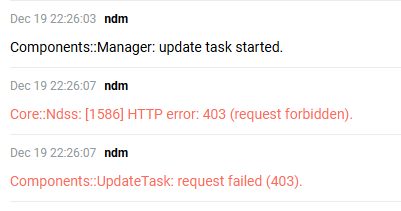
Hello everyone. KN-1711 EU does not update to the new firmware 4.2.4.The update to 4.3 Alpha 10.1 is proceeding normally. Update error "no access". Has anyone encountered this?
-
Keenetic Peak and APC Back-UPS ES700
SySOPik replied to Chezzie's question in Community Support & Knowledge Exchange
Obviously, a UPS is not the best solution for a router, since the router does not know how to manage it. I recommend you to look at special UPS for routers.

-
Is there a managed switch between the devices?
-
Setup Keenetic router in Telekom FTTH / Glasfaser
SySOPik replied to nealt's question in Community Support & Knowledge Exchange
I think, it will be implemented soon. https://blog.keenetic.com/statement-on-ukraine/
