


Leshiyart
-
Posts
133 -
Joined
-
Last visited
-
Days Won
4
Content Type
Profiles
Forums
Gallery
Downloads
Blogs
Events
Posts posted by Leshiyart
-
-
https work with ssl certificate, use keendns name
or use DDNS + ip http ssl acme get "DDNS name" -
On 4/16/2026 at 2:52 PM, Anton S said:
is it possible? Several providers over 1 phisical port with different VLANs
yes, its possible with CLI
interface GigabitEthernet1/VlanX
up
ip address xxxxx (or dhcp)
ip global auto
exit
interface GigabitEthernet1/VlanYup
ip address xxxxxip global auto
exit
system configuration save
example for wan port for some model, if wan port in switch other command-
 1
1
-
-
17 hours ago, Anonymos said:
So i have my own AmneziaVPN proxy server in netherlands and i successfully added my access policy using this tutorial. Its official amnezia tutorial. So it works really good, and my question is how can i make router use the following policy only when lan user accesses a website from like some kind of white list?
1) static route
2) since keenos 5.aIntroduced a new routing option based on FQDN object-groups, enabling more precise and flexible control over traffic directed to specific domain names. [NDM-3946]
-
dns-proxy route object-group {group} [{interface} | {gateway} [interface]] [auto] [reject]— set routing destination{interface}or{gateway}for domain names listed in the object-group{group}.
3) entware + xxxxx
17 hours ago, Anonymos said:Also i'd like to mention that i have synology NAS, so i'd like to route its traffic thru vpn when its downloading torrents, it has static ip setup
macvlan network for docker.... will have his own mac
-
-
interface Proxy1 proxy socks5-udp not work? try this
-
On 7/12/2025 at 1:38 AM, extros said:
Is there anyone who can certifiably verify the reply I received, or anyone who can tell me the correct way to gain local access via https, without allowing remote access?
-
45 minutes ago, Victor Horseman said:
Address = xxxxx
xxxx/32 ?
PersistenKeepAlive = 20-
 1
1
-
-
1 hour ago, Victor Horseman said:
Everything worked fine in version 4.3.3. But after the update, importing stopped working (at least the name is empty), and even if you manually create it from scratch and set all the settings, it still won't connect. So, on version 4.3.4, WireGuard is a little less than completely broken.
manual write PresharedKey from wg.conf, fixed in 4.3.5/5.a6
-
On 7/4/2025 at 10:55 AM, zfoxx said:
It turns out to be a loop
is the switch managed? if yes then it is not configured correctly, there will be no loops. configure it or use unmanaged. try in cli mws stp priority 16384 or from version 4.3 mws stp encapsulation with recapture of points
-
On 7/2/2025 at 12:33 PM, zfoxx said:
How to solve this problem?
connect with wire
-
-
On 4/25/2025 at 12:38 AM, Musab İnce said:
Is there any way to force Keenetic to validate the proxy connection instead of just marking it as connected?
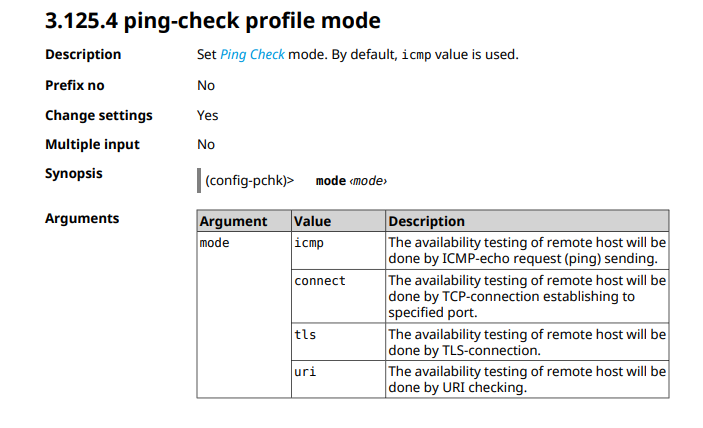
ping-check in cli
ping-check profile _WEBADMIN_Proxy0
host xxxxx.xx
update-interval 10
mode tls
max-fails 5
interface Proxy0 ping-check profile _WEBADMIN_Proxy0 -
upnp lan BridgeX
upnp lan Bridge1 guest segment default -
service ssh
system configuration save-
3
-
-
since 4.2.1
-
You can now assign Network ports on Extender devices to any configured network segment using the Command Line Interface (CLI). Alternatively, you may wish to disable the Network ports for security reasons. [NDM-3162]
-
mws member {member} port {port} [no] access {interface}— assign{port}on a{member}node to access an{interface}segment; -
mws member {member} port {port} [no] disable— disable{port}on a{member}node.
-
-
-
no ip nat Bridge0
no ip nat BridgeX
ip static Bridge0 ISP
ip static BridgeX ISP -
fix in CLI interface mac address factory wan
after updates and apply system save configuration
Access from Internet su GUI using Public IP Address
in Feature Requests
Posted
yes, https work with fqdn, you must obtain this certificate with ip http ssl acme get mydomain.xxxxx, use other ddns server for this
(you must have A dns record for this mydomain.xxxxx linked with you public ip)