
Leshiyart
-
Posts
133 -
Joined
-
Last visited
-
Days Won
4
1 Follower

Recent Profile Visitors
3126 profile views


Leshiyart's Achievements

Advanced Member (3/5)
53
Reputation
-
Access from Internet su GUI using Public IP Address
Leshiyart replied to bobuzi's question in Feature Requests
yes, https work with fqdn, you must obtain this certificate with ip http ssl acme get mydomain.xxxxx, use other ddns server for this (you must have A dns record for this mydomain.xxxxx linked with you public ip) -
Access from Internet su GUI using Public IP Address
Leshiyart replied to bobuzi's question in Feature Requests
https work with ssl certificate, use keendns name or use DDNS + ip http ssl acme get "DDNS name" -
yes, its possible with CLI interface GigabitEthernet1/VlanX up ip address xxxxx (or dhcp) ip global auto exit interface GigabitEthernet1/VlanY up ip address xxxxx ip global auto exit system configuration save example for wan port for some model, if wan port in switch other command
- 1 reply
-
- 1
-

-
1) static route 2) since keenos 5.a Introduced a new routing option based on FQDN object-groups, enabling more precise and flexible control over traffic directed to specific domain names. [NDM-3946] dns-proxy route object-group {group} [{interface} | {gateway} [interface]] [auto] [reject] — set routing destination {interface} or {gateway} for domain names listed in the object-group {group}. 3) entware + xxxxx macvlan network for docker.... will have his own mac
-
interface Proxy1 proxy socks5-udp not work? try this
-
Why can't I access modem's web management portal via https
Leshiyart replied to extros's question in Community Support & Knowledge Exchange
https://keendns.name -
xxxx/32 ? PersistenKeepAlive = 20
-
manual write PresharedKey from wg.conf, fixed in 4.3.5/5.a6
-
How can I implement Wi-Fi coverage of isolated rooms?
Leshiyart replied to zfoxx's question in Community Support & Knowledge Exchange
is the switch managed? if yes then it is not configured correctly, there will be no loops. configure it or use unmanaged. try in cli mws stp priority 16384 or from version 4.3 mws stp encapsulation with recapture of points -
How can I implement Wi-Fi coverage of isolated rooms?
Leshiyart replied to zfoxx's question in Community Support & Knowledge Exchange
connect with wire -
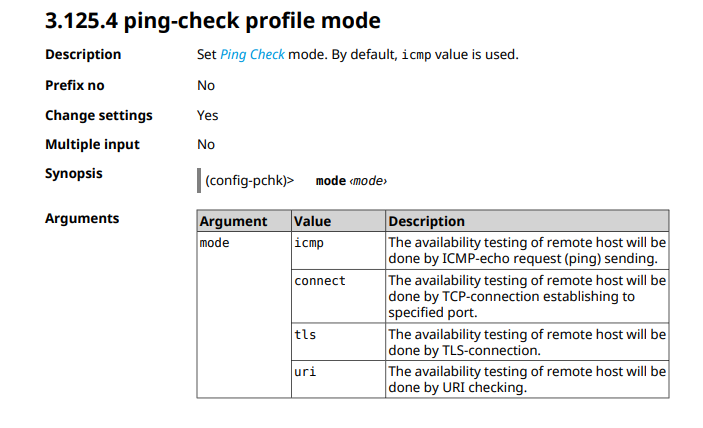
ping-check in cli ping-check profile _WEBADMIN_Proxy0 host xxxxx.xx update-interval 10 mode tls max-fails 5 interface Proxy0 ping-check profile _WEBADMIN_Proxy0
-
upnp Upnp for two local network segments
Leshiyart replied to Home Assistant's question in Feature Requests
upnp lan BridgeX upnp lan Bridge1 guest segment default -
SSH connection refused
Leshiyart replied to delumerlino's question in Community Support & Knowledge Exchange
service ssh system configuration save -
lan ports on extender
Leshiyart replied to DJFrens's question in Community Support & Knowledge Exchange
since 4.2.1 You can now assign Network ports on Extender devices to any configured network segment using the Command Line Interface (CLI). Alternatively, you may wish to disable the Network ports for security reasons. [NDM-3162] mws member {member} port {port} [no] access {interface} — assign {port} on a {member} node to access an {interface} segment; mws member {member} port {port} [no] disable — disable {port} on a {member} node.