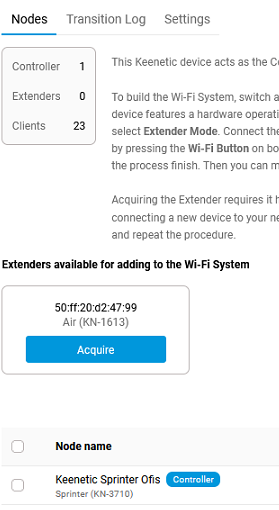
Hi mates, thanks for reading and support. Honestly I'm shocked about this brand, in the middle of the day my friend's restaurant was disconnected from internet, when I came I've noticed the router lost its configuration, it kept only password to log in, WAN IP lost, as well as WiFi SSID, DHCP etc. I've set all back but it doesn't want now to acquire the extension, I've reset it to the factory setting, I press the button but after 2 seconds it goes back doing nothing. I'm really annoyed about that, I don't know the reasons of this problem, what can I do now? Should I reset to factory the main router too? Can be the router's settings got corrupted from the update?
I've to go there again..
I guess this is beacause of this damned new 5.0.4 version, why it updated in the middle of the day, I'll for sure disable any future update in this router once this is fixed
You can post now and register later.
If you have an account, sign in now to post with your account.
Note: Your post will require moderator approval before it will be visible.


Question
GiovanniG
Hi mates, thanks for reading and support. Honestly I'm shocked about this brand, in the middle of the day my friend's restaurant was disconnected from internet, when I came I've noticed the router lost its configuration, it kept only password to log in, WAN IP lost, as well as WiFi SSID, DHCP etc. I've set all back but it doesn't want now to acquire the extension, I've reset it to the factory setting, I press the button but after 2 seconds it goes back doing nothing. I'm really annoyed about that, I don't know the reasons of this problem, what can I do now? Should I reset to factory the main router too? Can be the router's settings got corrupted from the update?
Edited by GiovanniGI've to go there again..
I guess this is beacause of this damned new 5.0.4 version, why it updated in the middle of the day, I'll for sure disable any future update in this router once this is fixed
10 answers to this question
Recommended Posts
Join the conversation
You can post now and register later. If you have an account, sign in now to post with your account.
Note: Your post will require moderator approval before it will be visible.