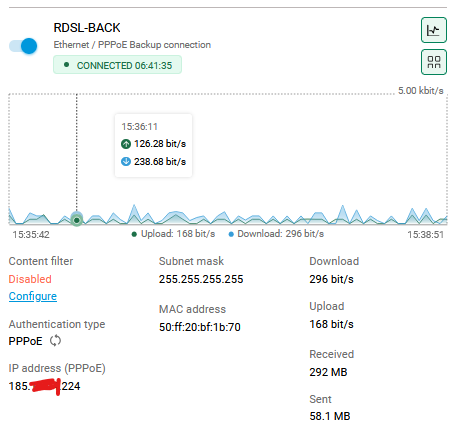
bobuzi Posted May 5 Posted May 5 Access from Internet su GUI using Public IP Address, like https://185.xxx.xxx.224 where IP 185.xxx.xxx.224 is an IP of Router (any interface) . Quote
0 Leshiyart Posted May 7 Posted May 7 (edited) https work with ssl certificate, use keendns name or use DDNS + ip http ssl acme get "DDNS name" Edited May 7 by Leshiyart Quote
0 bobuzi Posted May 7 Author Posted May 7 Hi Leshiyart, tnx. Can you share more details on this solution? "DDNS + ip http ssl acme get "DDNS name" I m new on Keenetic OS. Quote
0 Eug Family Posted May 8 Posted May 8 (edited) Register the YourName.keendns.pro in the Keen DNS. Connect to the web interface using the specified name (YourName.keendns.pro). The main thing is to set a strong password. Edited May 8 by Eug Family Quote
0 bobuzi Posted May 8 Author Posted May 8 The Keen DNS, it's ok, but not for my installations. I need access via IP, on all Public IP of all Interfaces. Quote
0 Eug Family Posted May 8 Posted May 8 Then try to grant access from external IPs to the desired one on the interface in the firewall Quote
0 bobuzi Posted May 8 Author Posted May 8 The only way it's enable GUI on HTTP port and add Firewall rules to permit only desired IP an block all others IPs. HTTPS work only whit FQDN and Certificate. Not whit IP. Quote
0 Leshiyart Posted Tuesday at 05:07 PM Posted Tuesday at 05:07 PM On 5/8/2026 at 12:21 PM, bobuzi said: HTTPS work only whit FQDN and Certificate. Not whit IP. yes, https work with fqdn, you must obtain this certificate with ip http ssl acme get mydomain.xxxxx, use other ddns server for this (you must have A dns record for this mydomain.xxxxx linked with you public ip) Quote
0 corniger Posted yesterday at 05:55 PM Posted yesterday at 05:55 PM If you want to access over your public IPs, though, there's no need to set up anything apart from opening the HTTP access on the Management - Users & Access - Inbound Management Access: apply HTTP + HTTPS. mind that this will not be secure, as you'll be using plain http to open website by its IP address. not recommended in WAN scenario. recommended practice is to use KeenDNS - it has Direct mode where your traffic goes via your IP directly, not using cloud bounce all this is in KB by the way, try support section on the Keenetic website Quote
0 corniger Posted 23 hours ago Posted 23 hours ago And if you want not the setting as it is currently implemented (ie to use direct mode KeenDNS name, which at moment works on a system primary connection, be noted - backup connections won't get pointed to until become primary), but actually post a feature request (as per forum section), then there's little chance it is automated. System would have to store certificate issued for IP address (not domain name), which is uncommon and also not secure. sorry I'm not telling more, as simple AI question reveals a bunch of 'why's it is not recommended even from a user point of view. In a case this address is dynamic, for one, router will have to request new certificate and revoke the old one each time the change happens, This is definitely not what your CA provider expects. And if you suddenly get the CG-NAT you instantly lose access (which wouldn't be a problem with KeenDNS solution, as it can automatically fall back to cloud base). I simply had a thought as there was an example above, where protocol is https and address is actually the IPv4 number. this is not how it works, usually Please confirm if you want specifically access via HTTPS protocol using cleartext IP of your router, and if that is the case, then any details you can share may be of help. Quote
0 bobuzi Posted 10 hours ago Author Posted 10 hours ago I agree with you that this type of access via IP and HTTP can be insecure. However, in complex deployments (for example, 3 WAN connections with 3 static public IPs), we need the ability to access the device through any of those connections. Using Keenetic KeenDNS works well in environments with a limited number of installed routers. But how does KeenDNS handle a scenario with 3 WANs and 3 public IPs? FQDN associated to on of 3 IPs... The requirement is to have selective access and full control of the device depending on the active WAN or reachable public IP. In addition, for each router it is necessary to generate a dedicated KeenDNS FQDN and maintain a complete inventory. Now imagine managing 100 routers, each with 2 or 3 public IP addresses. My interest is to access the GUI directly via IP address, preferably using HTTPS. Now via HTTP and IP work fine. Quote
0 Eug Family Posted 8 hours ago Posted 8 hours ago Do you use all 3 internets at the same time in load balancing mode or as a backup? I have 2 providers, it works in the main and secondary connect (back-up mode), with a public IP. The connection is through keendns, through the priority provider, and in case of its disconnection, it automatically goes through the backup one. Quote
0 bobuzi Posted 8 hours ago Author Posted 8 hours ago "The connection is through keendns, through the priority provider, and in case of its disconnection, it automatically goes through the backup one." Ok, now it's more clear, but on my scenario, I need to access via GUI to all WAN and manage the device. This is all. Quote
0 Eug Family Posted 7 hours ago Posted 7 hours ago I use RMM for that. You can connect all the routers via VPN and access them all at once from one location. Quote
0 bobuzi Posted 6 hours ago Author Posted 6 hours ago RMM is always in beta, it's slow, RMM is not available as a self-hosted instance on my private cloud. Access to the GUI is done through the Keenetic proxy service external of my infrastrucure. This type of usage is not desired. I will explore others solutions for access GUI. Quote


Question
bobuzi
Access from Internet su GUI using Public IP Address, like https://185.xxx.xxx.224 where IP 185.xxx.xxx.224 is an IP of Router (any interface) .
14 answers to this question
Recommended Posts
Join the conversation
You can post now and register later. If you have an account, sign in now to post with your account.
Note: Your post will require moderator approval before it will be visible.