
eralde
-
Posts
1914 -
Joined
-
Last visited
-
Days Won
96
Content Type
Profiles
Forums
Gallery
Downloads
Blogs
Events
Everything posted by eralde
-

Download station and different internet gateway
eralde replied to Luca Zammarchi's question in Feature Requests
Hi @Luca Zammarchi Please read this thread: It explains how to configure the Download Station for a setup similar to yours. -
Confirm Button Not Visible in "Install Updates" Screen / 4.3B3
eralde replied to ru.celebi's question in Dev channel issues & test reports
Hello @ru.celebi, which version of the firmware is currently installed on your devices? -
Core::Configurator: not found: "show/sc/mws/wlan"
eralde replied to PriSonerS61's question in Dev channel issues & test reports
Thank you for the report. This will be fixed in one of the future draft versions. The web UI relies on new parts of the API that are not yet publicly available. The error messages will go away, once the API is updated. -
Unfortunately, there is a bug in the Alpha 3, related to the firmware update process. I suggest that you use the recovery utility described here: https://support.keenetic.com/sprinter/kn-3710/en/21740.html#21740-keeneticos-recovery And then you should be able to update to Alpha 4, where this issue is fixed. The link above is for KN-3710, you can find the recovery utility relevant to your particular model, by entering it's name here: https://support.keenetic.com/ and then searching for "Restore".
-
Hello @simone bravo, this is the expected behavior. Your device checks for radars that may be working on frequencies overlapping with the 5 GHz Wi-Fi. This article has more details: https://support.keenetic.com/hero/kn-1012/en/43659-dfs.html
-
Should I even THINK about upgradng packages in OpenWRT?
eralde replied to Jim's question in Community Support & Knowledge Exchange
That really depends on the applications you want to use there. If you plan to use a BitTorrent client to download smth., then you may need more storage than available on an average USB thumb drive. In this particular case, an external SSD would be the best choice, but the maximum read/write speed will be limited by the USB port (SSDs are usually faster). You can transfer your existing OPKG configuration to the new drive. I don't have any personal experience with this, but I've seen reviews from people who have done it. -
Should I even THINK about upgradng packages in OpenWRT?
eralde replied to Jim's question in Community Support & Knowledge Exchange
@Jim, installing OPKG (the base system + all the packages you choose) on an external USB drive is the assumed default setup. It definitely works. -
Should I even THINK about upgradng packages in OpenWRT?
eralde replied to Jim's question in Community Support & Knowledge Exchange
You should also be able do delete everything created by the OPKG installer via the web UI/telnet. -
Should I even THINK about upgradng packages in OpenWRT?
eralde replied to Jim's question in Community Support & Knowledge Exchange
Hello, Jim 🙂 Nothing is wrong with trying OPKG if you want to configure something that is not possible with the stock firmware. That being said there is no official support for any OPKG-related issues, so if you have an issue you will have to refer to other users, e.g., here on the forum or in the OpenWRT community. However, since Keenetic firmware is not OpenWRT the advice you will get from the OpenWRT community may be not fully applicable. On the other hand, I would suggest that you just back up your router's firmware and configuration files (startup-config) once you configured the stock firmware the way you want it. You can do that via the web UI. Even if something goes wrong with the OPKG, you can go the the router's web UI, de-select the USB drive you've installed OPKG to and keep using the stock firmware until you want to try again. If the "something goes wrong" situation is worse and you can't access the web UI -- you will always be able to restore the stock firmware using the files you backed up *. * The startup configuration file does not contain encryption keys used in the Wi-Fi system or in WireGuard interfaces. That means that if you restore your router's configuration using a backed up startup-config file, you will have to re-acquire any Wi-Fi system extenders (if you have them) and re-create WireGuard interfaces (if you use them). -
How do I manage space/applications on my router?
eralde replied to Jim's question in Community Support & Knowledge Exchange
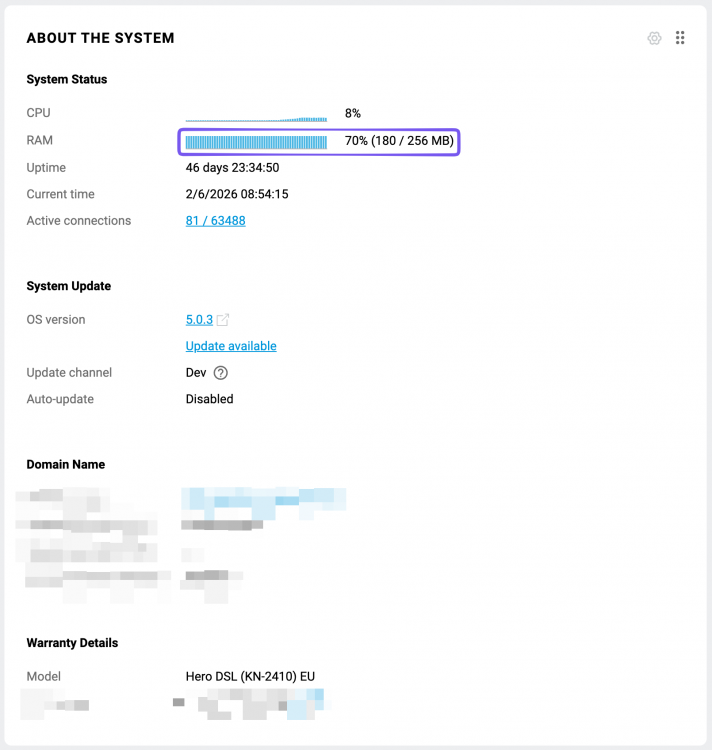
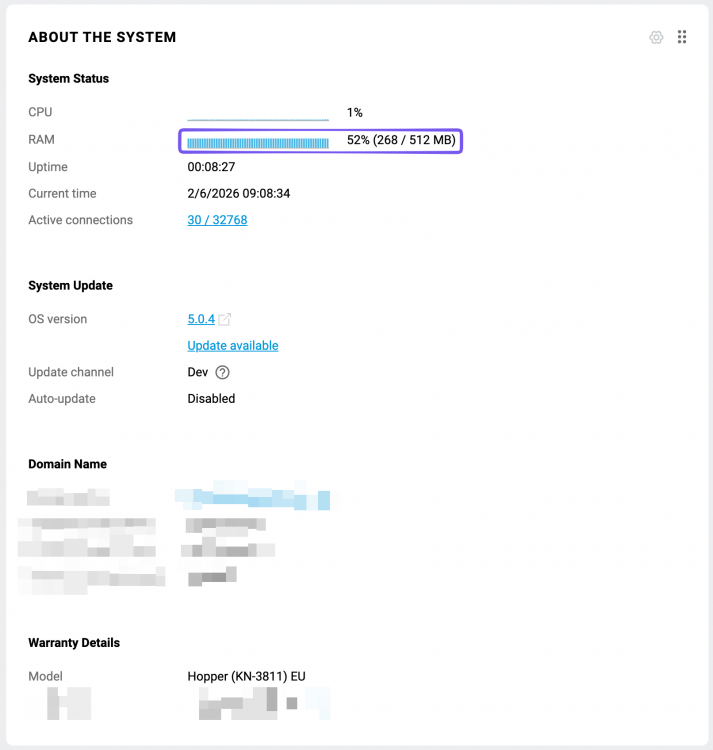
Hi, Jim! I am not sure I can answer all of your questions completely, but I will try to do my best: 1 + 2. If you are talking about RAM, then you can monitor that parameter in the web UI dashboard. There is no general rule of thumb on how many different service you will be able to run at the same time, so it is trial and error. If you meant permanent storage, than I would recommend to install the open package system on a USB drive. There is an option to install it on the device internal storage, but the available space will be quite limited. 3. You can check this GitHub repo and this section of the forum (the Entware Quickstart thread is a good start 🙂) 4. After setting up Entware/OPKG and logging into the SSH shell it provides, you can run opkg update && opkg list to see all the packages available for your device: 5. You can leave the "initrc script" field empty, the installer will fill this parameter automatically. Out KB article on how to install Entware on your router: https://help.keenetic.com/hc/en-us/articles/360021214160-Installing-the-Entware-repository-package-system-on-a-USB-drive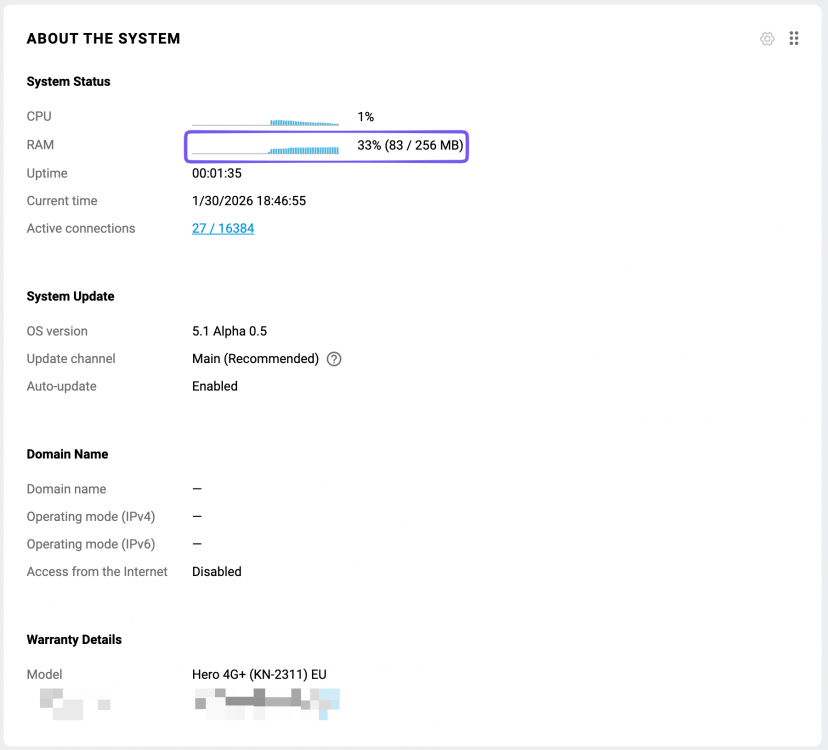
- 1 reply
-
- 1
-

-
Telnet rejected connection?
eralde replied to Jim's question in Community Support & Knowledge Exchange
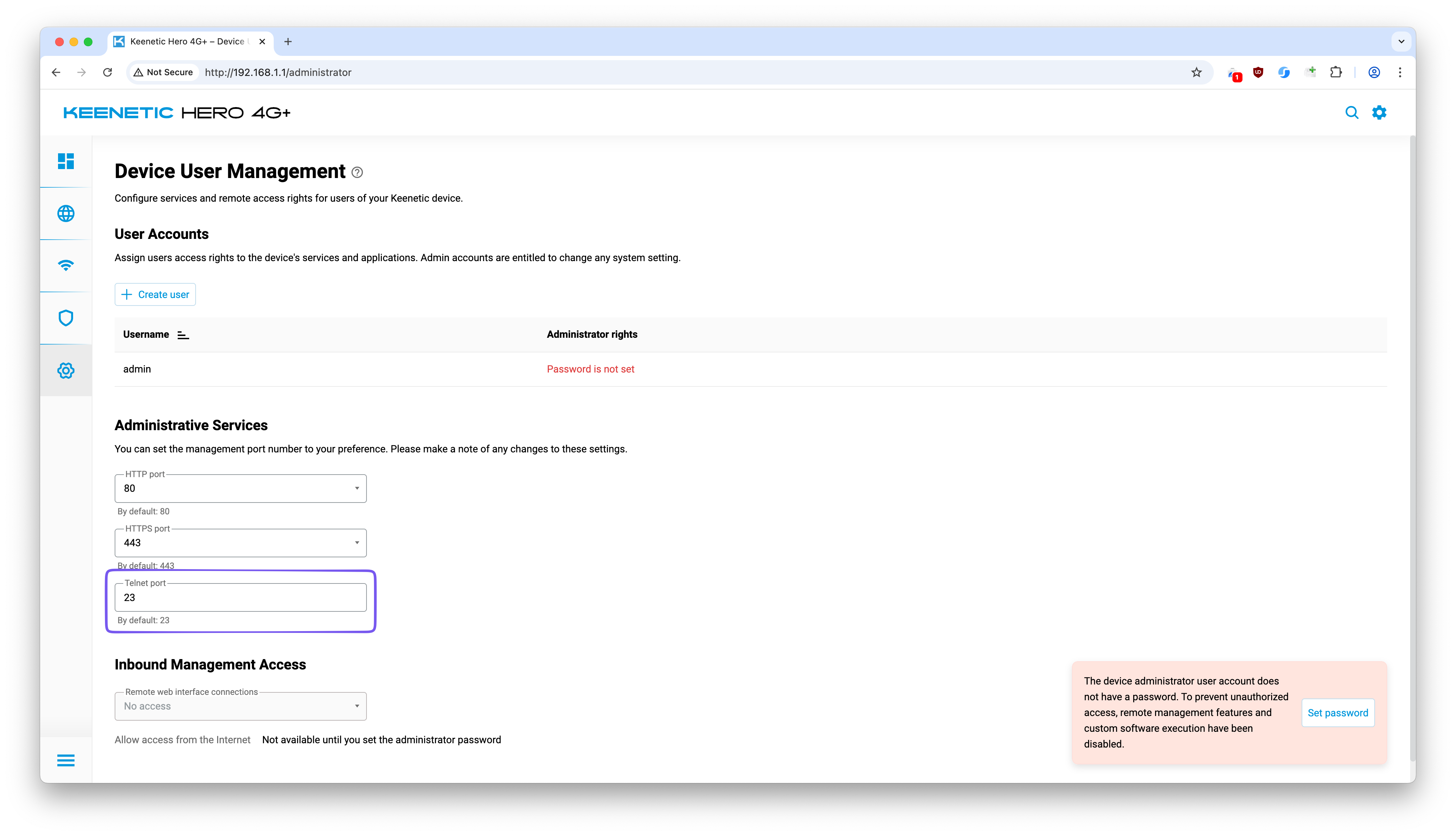
Okay, thank you 😅 That should not affect anything If you can access the router's web UI, you can check if the telnet port is the default one here: http://my.keenetic.net/administrator Also, from the web UI you can restart the internal telnet service: If that does not help, please download the self-test file from your device and attach it here, so we can check it (we will hide the message containing the file since it has some sensitive data in it, so you won't see it, but the moderators will still be able to access it).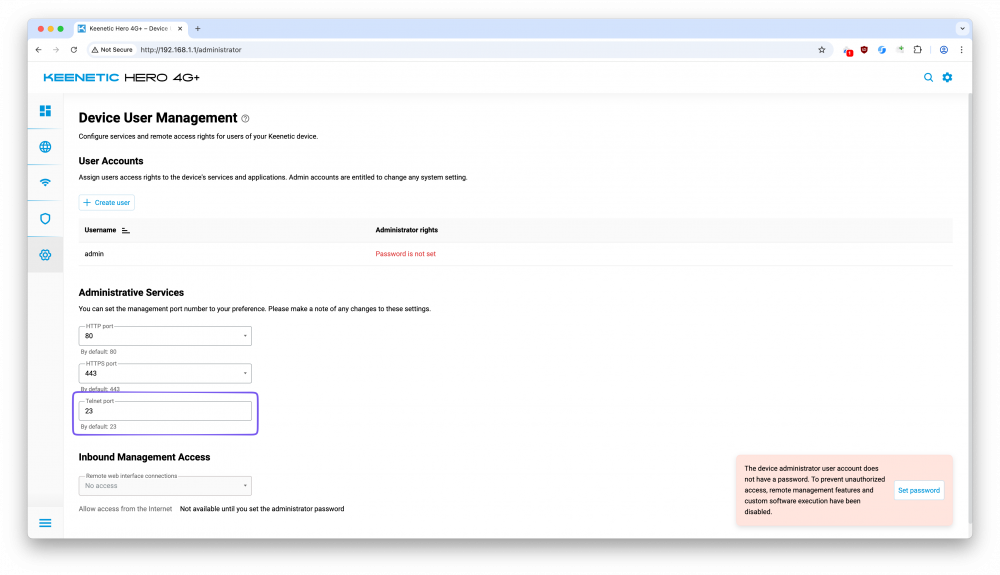
-
Telnet rejected connection?
eralde replied to Jim's question in Community Support & Knowledge Exchange
Hello, Jim The telnet access from the LAN should be enabled by default. I know this is a dumb question, but is your computer in the local network of your router when you try to connect it to the router? (i.e., is it connected to one of the grey Ethernet ports on the router/to router's Wi-FI) -
Wifi scheduling for nodes TitanBE7200 + 2 Buddy 6
eralde replied to Giaccaz's question in Community Support & Knowledge Exchange
Thank you for explaining why do you want it 🙂 We will keep that scenario in mind for the future. I would be happy to give you a timeline, but at this point, it's difficult to do so. We definitely have 10G models in our roadmap. -
Wifi scheduling for nodes TitanBE7200 + 2 Buddy 6
eralde replied to Giaccaz's question in Community Support & Knowledge Exchange
I think that in your case the easiest way would be to exclude the Buddy 6 that is placed in the garage from the Wi-Fi system. You can remove the Buddy 6 from the Wi-Fi system using the controller Web UI. After that you can set up that Buddy device again as a separate "Access Point" device (there is an option for that in the Initial Setup Wizard on that Buddy). You will still be able to configure that Buddy using it's own web UI, but the controller won't sync it's settings to it. That means that the work schedule on that Buddy can be 24/7 instead of the one you have inside your house. Unfortunately, that also means that you'll have to configure all the relevant settings (e.g., Wi-Fi SSID/password/...) on the Buddy itself. Some of those settings can be configured in the Initial Setup Wizard. For ones that you can't change there you'll have to log in to the Buddy web UI. You will see a link to it on the "Client Lists" page in the controller web UI. -
KN-3610 simultaneus untaged and taged VDSL VLAN possible?
eralde replied to moij258's question in Community Support & Knowledge Exchange
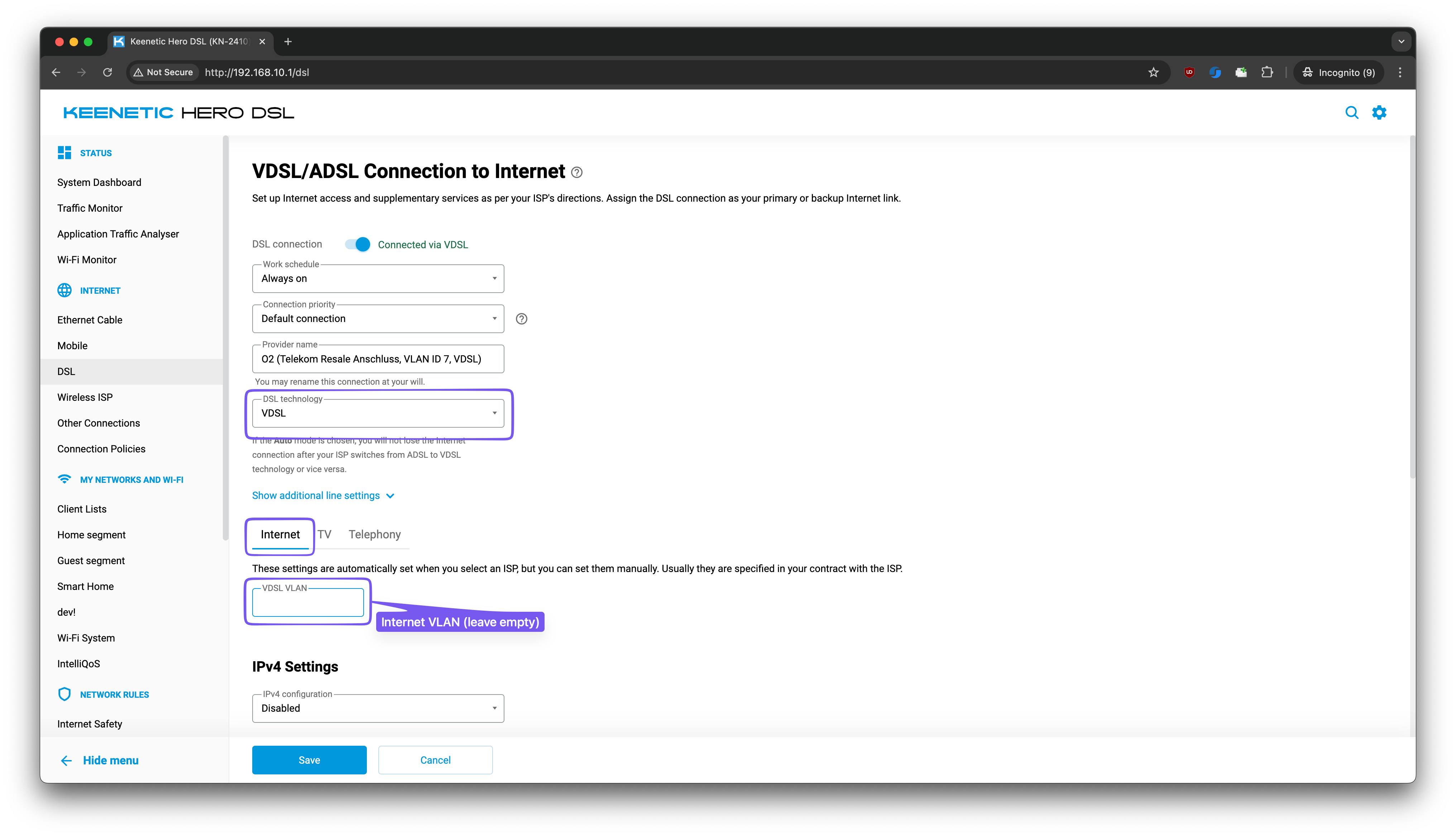
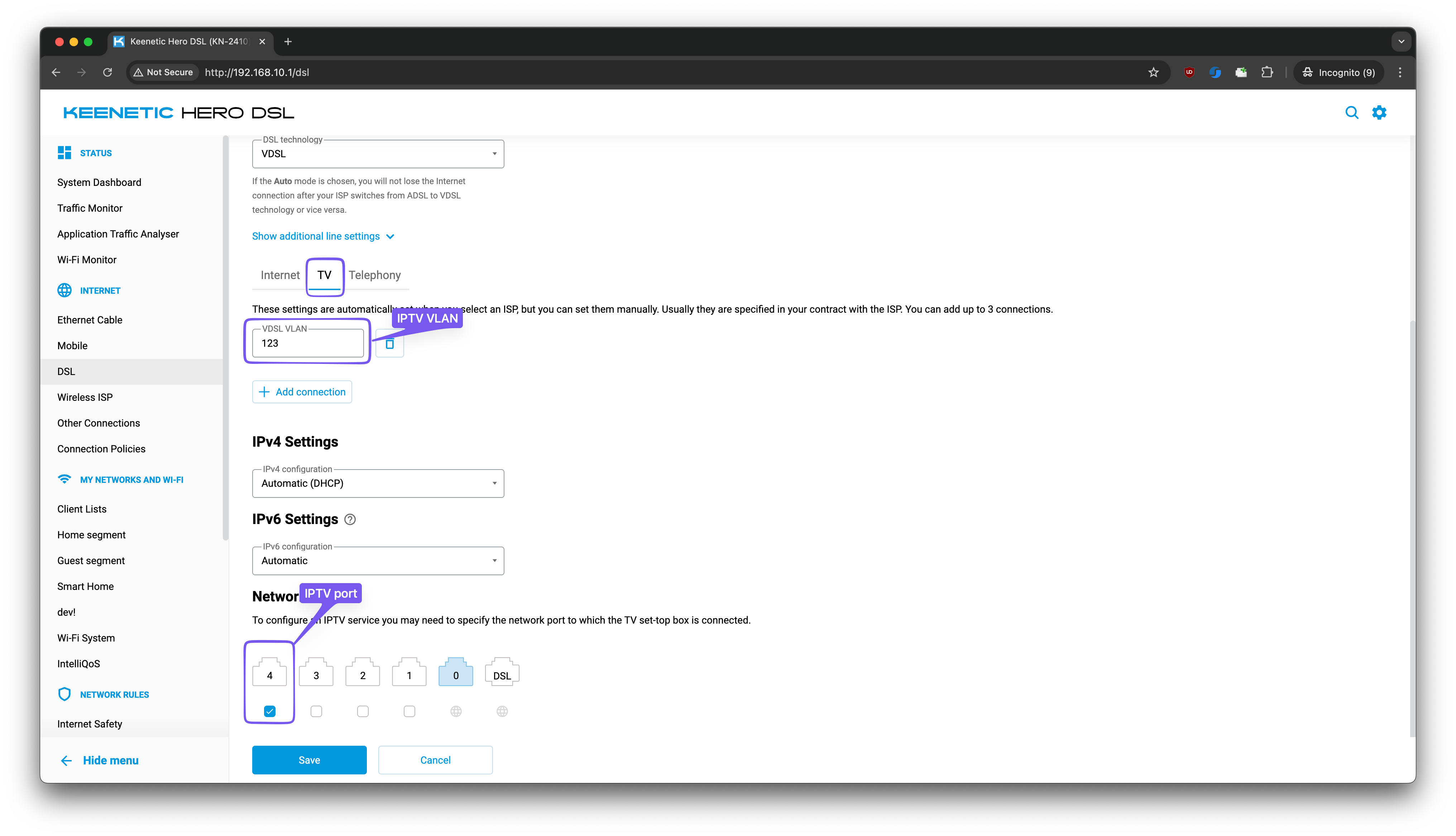
You can configure a configuration that you describe via the command line. It won't be possible to do it in the web UI. The resulting configuration file (startup-config) will contain something like this: ... interface Dsl0 rename DSL ip dhcp client dns-routes ip name-servers ... up ! ... interface Dsl0/Vlan0 security-level public ip address dhcp ip dhcp client dns-routes ip global 306 up ! interface Dsl0/Vlan123 security-level public ip address dhcp ip dhcp client dns-routes ip global 153 up ! ... However, I don't have enough expertise to answer any following questions about the setup you want. I kindly suggest that you contact our technical support: https://support.keenetic.com/ Our support engineers will be able to answer your questions better than I am. -
Wifi scheduling for nodes TitanBE7200 + 2 Buddy 6
eralde replied to Giaccaz's question in Community Support & Knowledge Exchange
Hello @Giaccaz unfortunately the setup you described is not possible to configure at the moment. Maybe you can consider configuring a separate Wi-Fi network (AccessPoint) interface specifically for the repeater? Then you can assign a separate schedule only for that Wi-Fi network. Could you elaborate a bit more on what issue you're trying to solve with this scheduling? -
KN-3610 simultaneus untaged and taged VDSL VLAN possible?
eralde replied to moij258's question in Community Support & Knowledge Exchange
Yes, this configuration (no VLAN for the Internet, only for IPTV) should work as you expect. I hope that helps 🙂 -
KN-3610 simultaneus untaged and taged VDSL VLAN possible?
eralde replied to moij258's question in Community Support & Knowledge Exchange
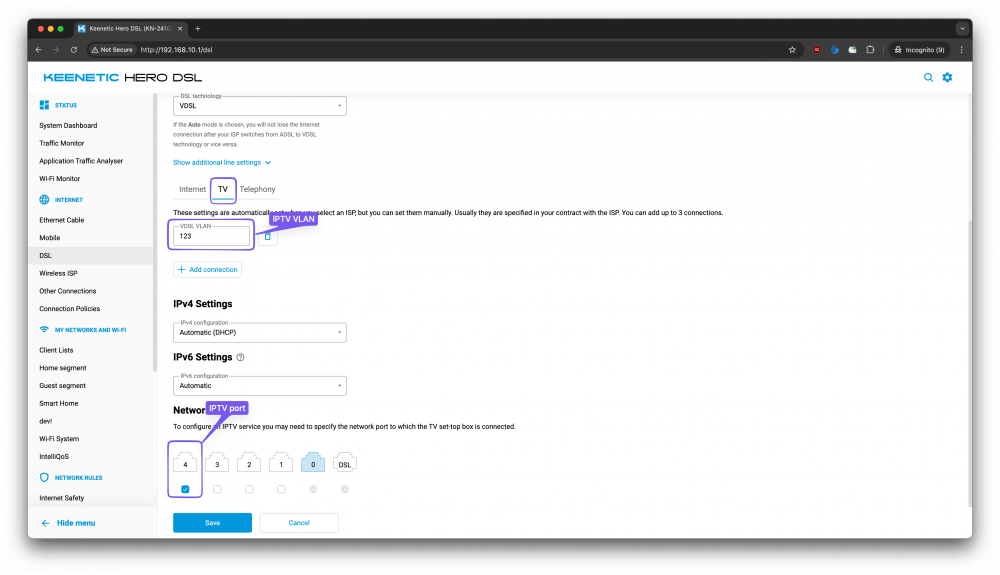
@moij258 if I understand you correctly, your goal is to configure something like this (in my example I configure the IPTV VLAN on the port #4):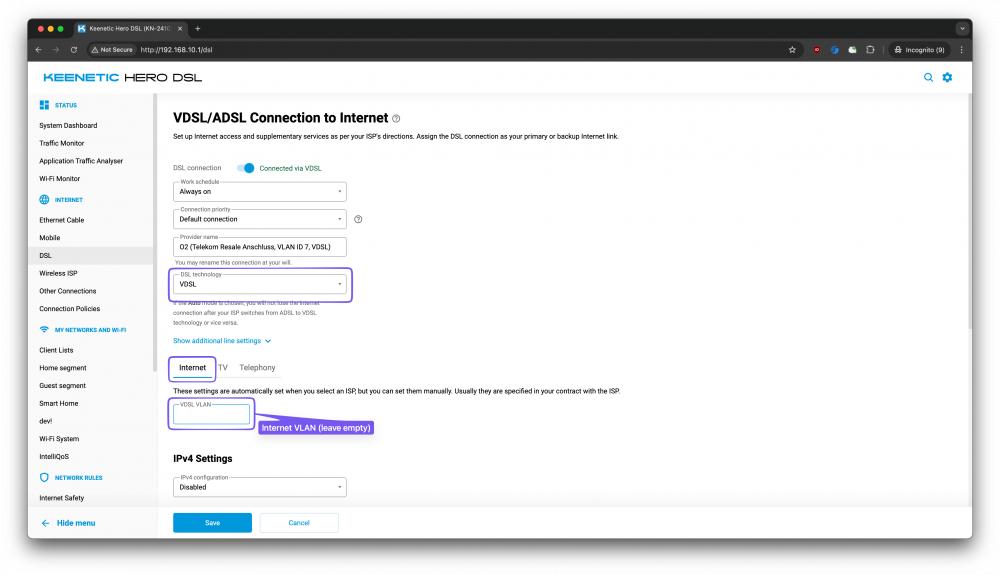
-
In order for IntelliQoS to properly prioritize traffic it needs to know the total amount of bandwidth available, that's why you see different results after manually specifying the download and upload speed. You said before that without any IntelliQoS configuration you typically get bandwidth values around 92 Mbps (download) / 22Mbps (upload). How do you measure those values? I am asking, because you said that you see different bufferbloat results after entering lower values manually (85/20). Could it be that the lower numbers are closer to the actual bandwidth of your connection?
-
Hi, @reshuffle812 What problem are you trying to solve with IntelliQoS? I see that you check the configuration by running a bufferbloat test, but if you could elaborate on what you're trying to achieve with getting certain values there, maybe we can provide a better advice about how to configure the Keenetic.
-
If you press Tab after entering part of the command it will show you the available autocomplete options. For example, if you press Tab after entering ip dhcp pool<space>, you will see the names of existing DHCP pool objects. After that you can check which options are available after you enter ip dhcp pool __POOL_NAME__ option<space> or ip dhcp pool __POOL_NAME__ option 66<space>. Maybe that will help you.
-
Hi @emresensoy, it looks like you need to change string to ascii in your command: (config)> ip dhcp pool _WEBADMIN option 66 ascii 192.168.2.1 Dhcp::Pool: "_WEBADMIN": set option 66.
-
Network port Schedule and Outbound firewall rules
eralde replied to David CHEVALIER's question in Feature Requests
I hope this will help you a bit with the REST API: https://github.com/Eralde/rci-tools It is a small side project I am working on. Feedback is appreciated 🙂 -
web gui wifi status
eralde replied to FartKnight's question in Community Support & Knowledge Exchange
The Web UI relies on the values in the startup-config. You should check if your automation changes the value there. If it is not so try adding the system configuration save command after you switch the Wi-Fi with Home Assistant. It should resolve the issue. -
Issue with authentication for REST API using KeenDNS name
eralde replied to em286's question in Community Support & Knowledge Exchange
Hi @em286 There is a way to do that using Entware nginx-ssl package. While it is not a very straightforward one, it should work. Install Entware Run opkg update && opkg upgrade && opkg-install nginx-ssl in the Entware shell Adjust /opt/etc/nginx/nginx.conf to proxy /auth and /rci/ requests to the firmware web server (see configuration below; replace "Home" segment address in it with 192.168.1.1) Configure xxx.yyy.keenetic.name to proxy requests to "This Keenetic Device" + nginx-ssl port This way X-NDM-Challenge and X-NDM-Realm headers will be preserved: $ curl -i https://rci.dev-3811.keenetic.link/auth HTTP/2 401 server: Web server date: Mon, 29 Dec 2025 07:51:34 GMT set-cookie: ... Path=/; SameSite=Strict; Max-Age=300 www-authenticate: x-ndw2-interactive ... x-ndm-realm: Keenetic Hopper x-ndm-challenge: BJ**** x-ndm-product: Hopper
- 1 reply
-
- 1
-