
eralde
-
Posts
1918 -
Joined
-
Last visited
-
Days Won
96
Content Type
Profiles
Forums
Gallery
Downloads
Blogs
Events
Everything posted by eralde
-

Grid Layout Issue in Edge / 4.3B3
eralde replied to ru.celebi's question in Dev channel issues & test reports
Yes, thank you! This will be fixed in one of the future versions. That is a separate issue (both the KeenDNS name/icon alignment and the spacing in the clients table have the same underlying cause). It also will be fixed -
Grid Layout Issue in Edge / 4.3B3
eralde replied to ru.celebi's question in Dev channel issues & test reports
@ru.celebi thank you for the report! It would be better if you don't hide the posts you publish here. If you don't want to include personal information (e.g. device names / IP addresses / MAC addresses) in your screenshots – blur them out before uploading the images. Firstly, this way you won't post two identical posts, and secondly, if your posts are visible, other users will also be able to check if they have the same problem. Thanks again for reporting the problems -
Titan KN-1810 - Openvpn Issue
eralde replied to fritz box's question in Community Support & Knowledge Exchange
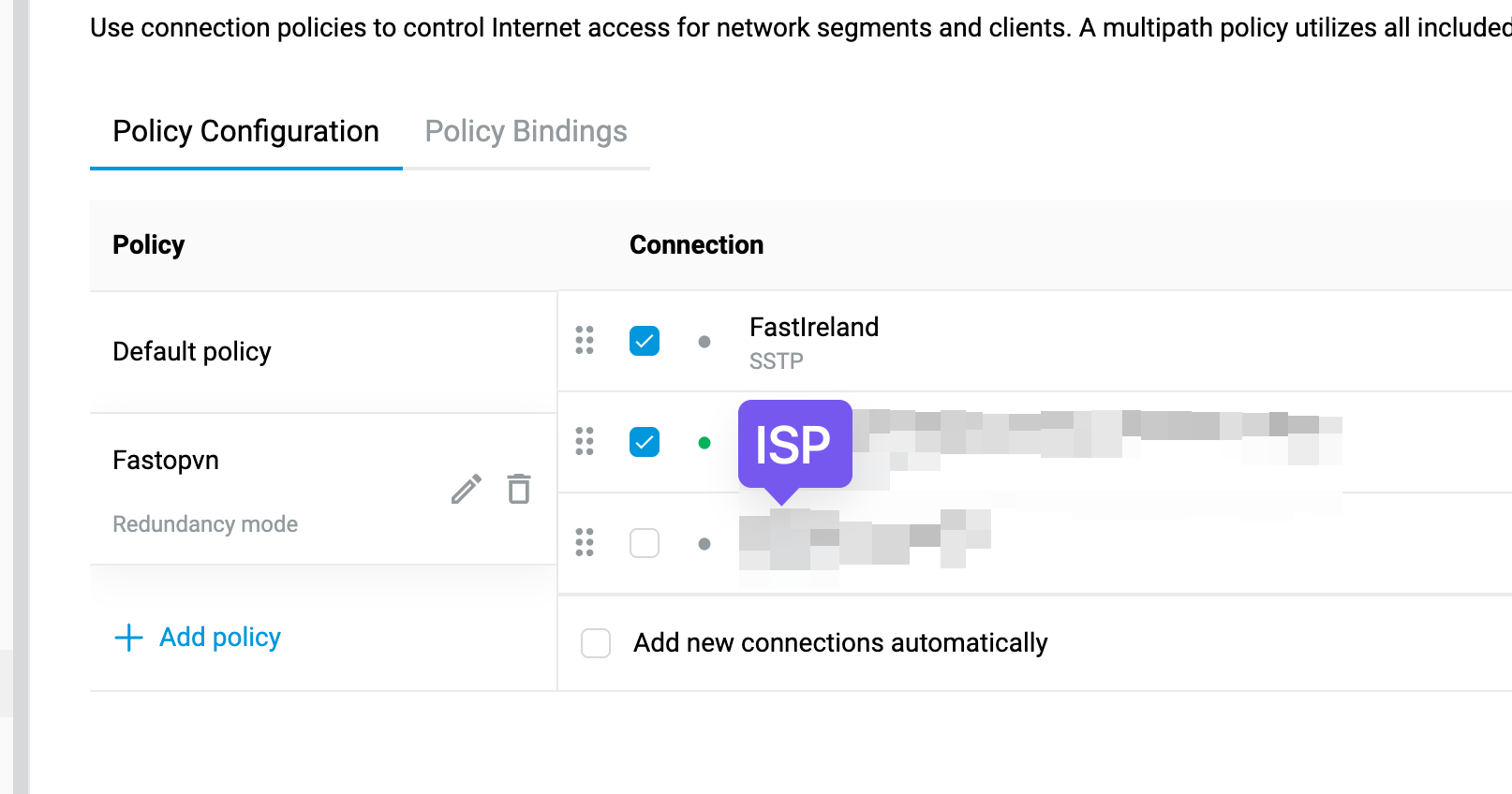
Thank you for the self-test file! The configuration looks correct. Can you try something? Will your devices have Internet access if you: - disable multipath in that policy - remove rate-limiting for the OpenVPN interface ? Should look similar to this: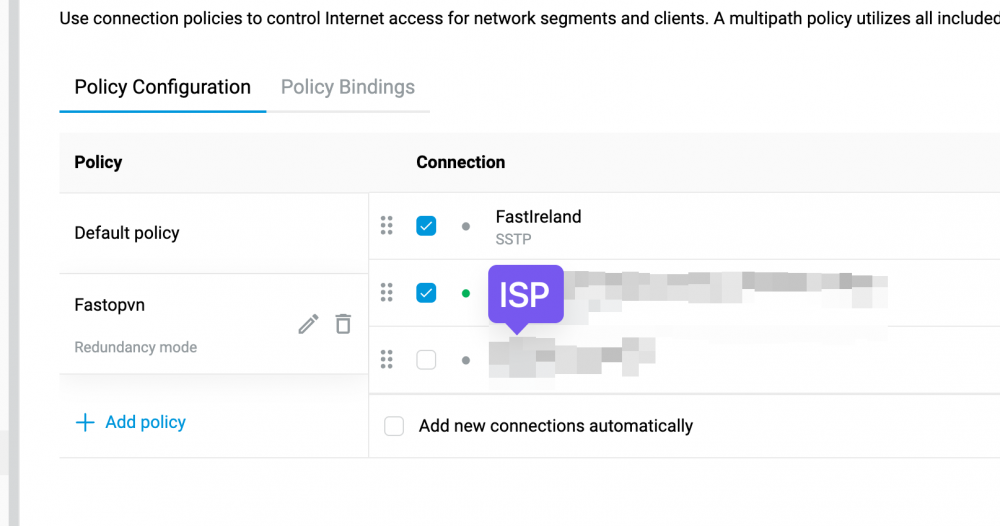
-
Titan KN-1810 - Openvpn Issue
eralde replied to fritz box's question in Community Support & Knowledge Exchange
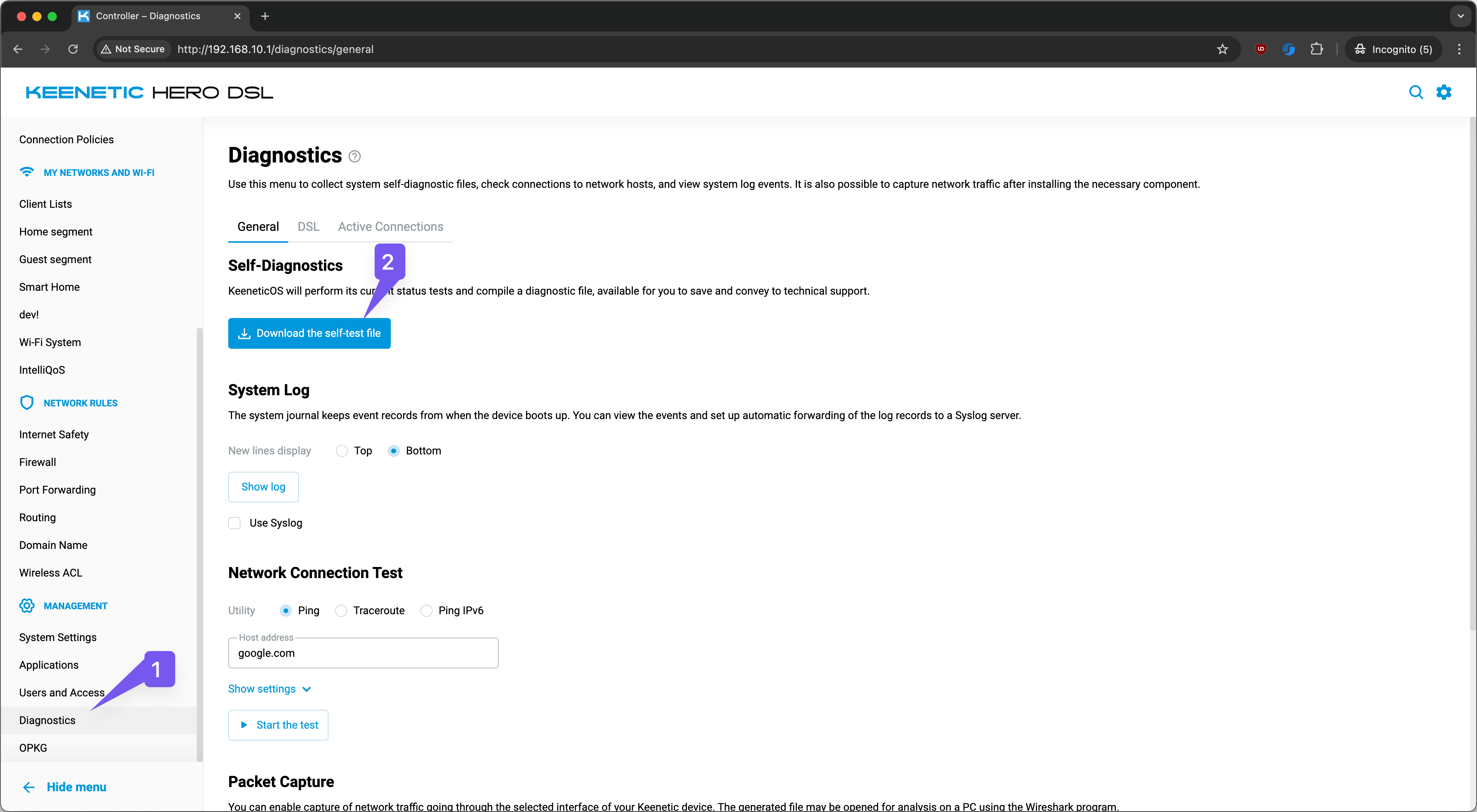
Hello @fritz box Please attach either a couple of screenshots of your browser with Policy Connections/Policy Bindings or a self-test file (you can download it from the Diagnostics page or the System Settings page. If you decide to attach the self-test file, please toggle the "Hide" toggle when adding a new message to this thread, so only the moderators of the forum will see your message.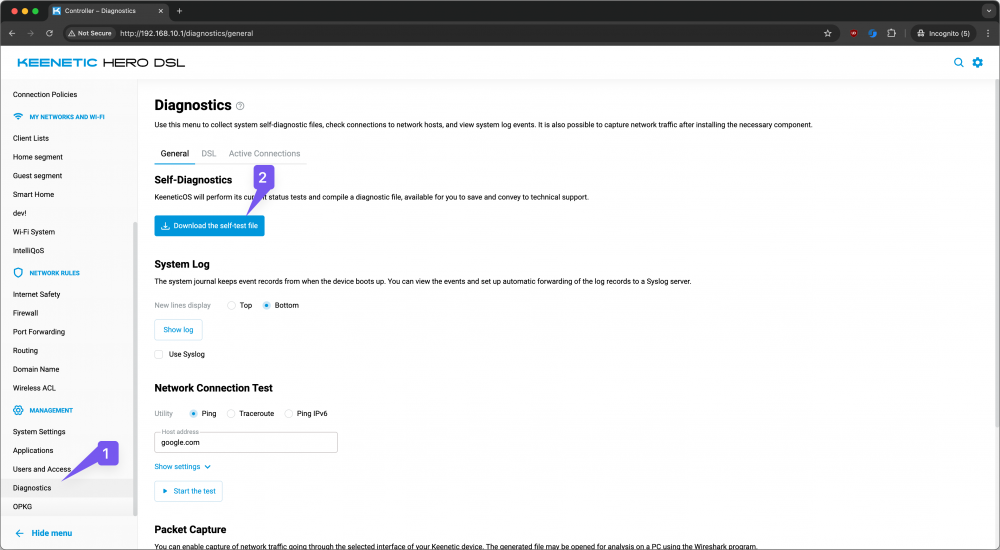
-
4.3 Beta 3 "General System Settings" possible issue
eralde replied to Serhij's question in Dev channel issues & test reports
This is expected behavior. The fail-safe mode is designed to prevent the device from losing remote access to the device when its settings are changed. Each of these operations can result in loss of remote access to the device.- 1 reply
-
- 1
-

-
KN-1812 and AI IntelliQoS
eralde replied to Michał's question in Community Support & Knowledge Exchange
The IntelliQoS feature in Keenetic devices uses a DPI engine called PACE2. The provider of this DPI engine says that it will use some AI techniques to classify traffic. That's why we also say that we have the AI IntelliQoS in our products. Since every Keenetic model uses the same DPI engine, every model will get the AI version with a firmware update at some point. -
Hero 4G+ (KN-2311). SMS gateway, SMS API and AT commands
eralde replied to Enrico's question in Community Support & Knowledge Exchange
Hello, Enrico! Yes, it is possible to send and list received SMS via the REST API. The easiest way to do it is to see how the web interface interacts with the router. I wrote an extended explanation for USSD requests here: Commands for reading/sending SMS are quite similar (sms {interface} list, sms {interface} send, sms {interface} delete, sms {inteface} read). A simple example: A few extra notes: - you need to be authorized on the Keenetic to send the requests; the auth process is described here (in Russian): https://forum.keenetic.ru/topic/5461-не-работает-digest-авторизация-для-rci/#findComment-62946 preserve session cookies while sending follow-up GET requests - don't forget to set the Content-Type HTTP header for your requests (Content-Type: application/json)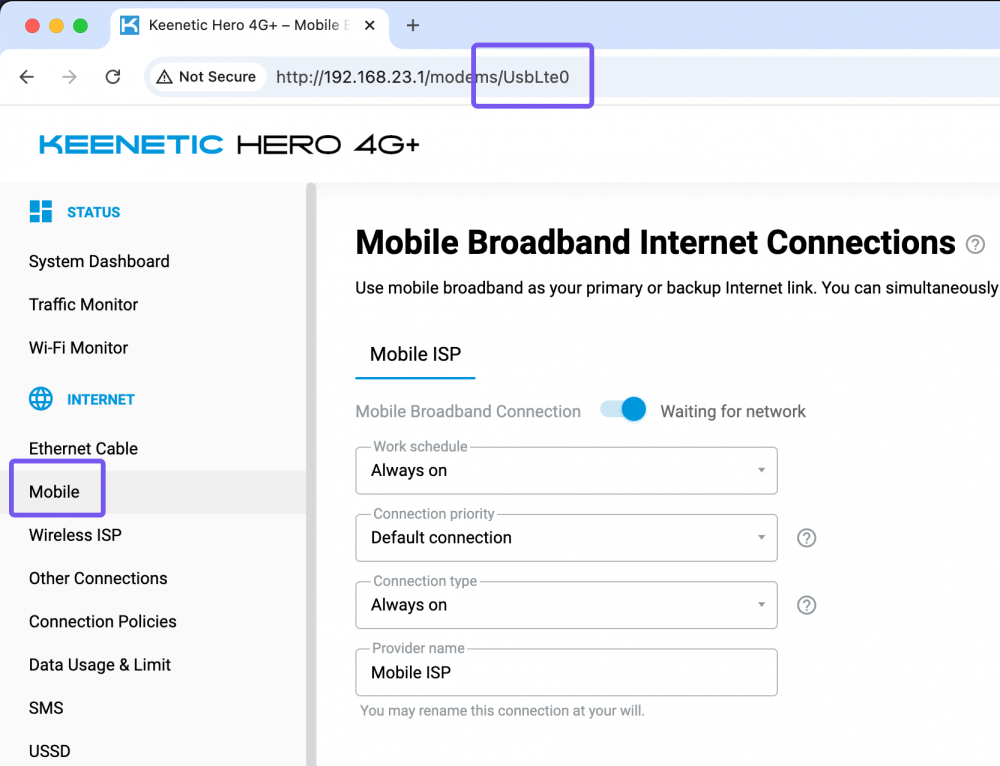
- 1 reply
-
- 2
-

-
-
[Issue] Quit Wi-Fi Mesh System Page While Acquiring
eralde replied to KYTECHNGAMING's question in Web interface
Thank you for the report! Looks like the MWS controller send incomplete data to the web UI. If that situation repeats itself, it would be helpful to: - download a self-test file from the controller - open <keenetic address>/rci/show/mws/member (e.g. http://my.keenetic.net/rci/show/mws/member), save the displayed JSON as a text file and upload it here along with the self-test file -
KN-3812, 4.3 BETA1. Wizard setup bug
eralde replied to lendysx16's question in Dev channel issues & test reports
Hi! You can disable the wizard altogether by sending a following query, using fetch: fetch( 'http://192.168.1.1/rci/', { method: 'POST', headers: {'Content-Type': 'application/json'}, body: JSON.stringify([{easyconfig: {disable: true}}, {system: {configuration: {save: true}}}]), }, ); After you've send the query, you can open a new browser tab and navigate to http://192.168.1.1 and you should see the main web UI. But it would be very helpful, if you would provide some diagnostics to help us fix the issue. Could you open http://192.168.1.1/rci/easyconfig/state in a separate browser tab, copy the output and attach it to this thread as a hidden message? Thanks in advance! -
get mobile data usage through restapi
eralde replied to AliasNameless's question in Community Support & Knowledge Exchange
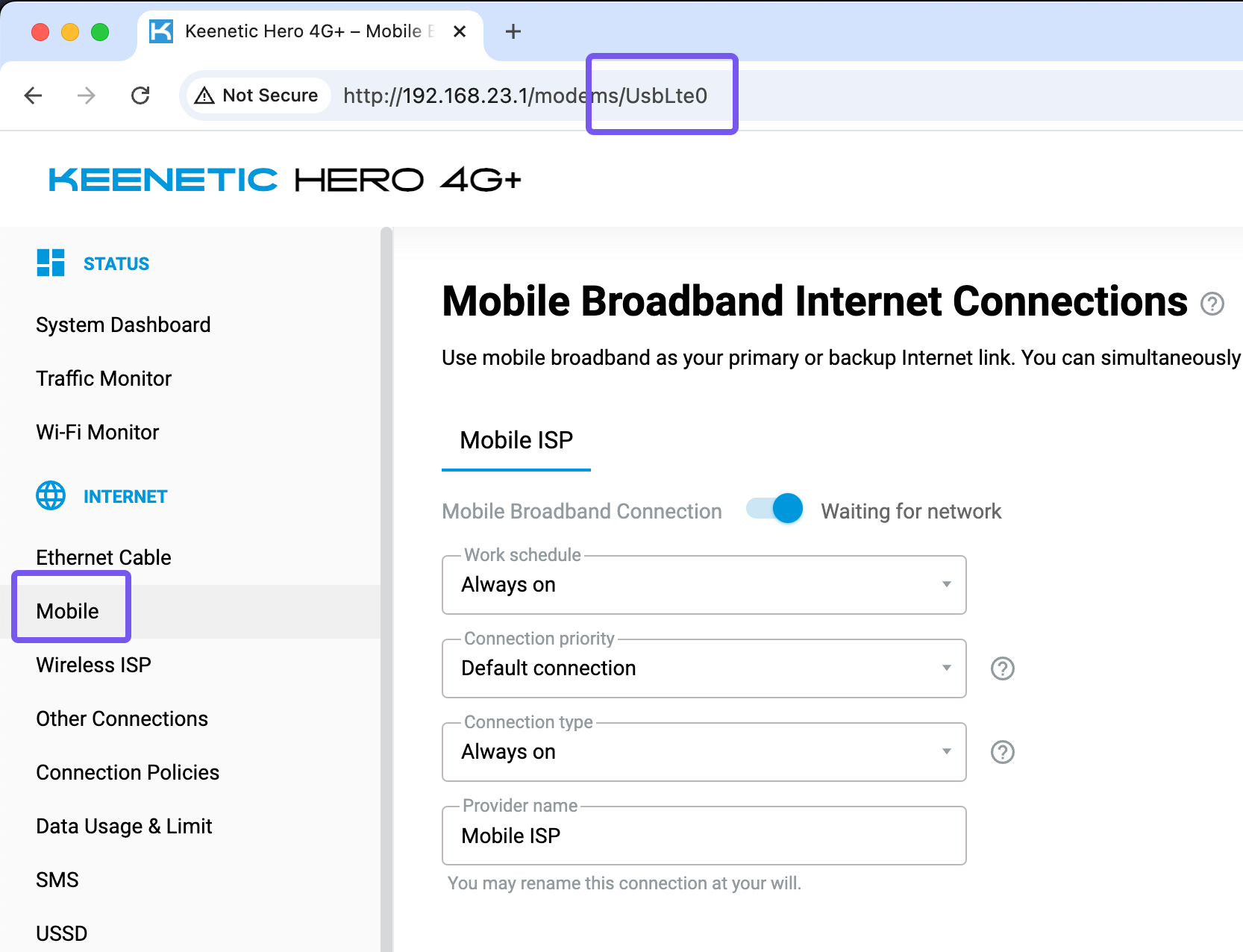
Yes, it is possible. To send a USSD request via REST API, you need to perform the following actions: 1. send a POST request to <keenetic_ip_or_domain>/rci/ussd/send with a JSON body specifying the interface and the request, for example: { "interface": "UsbLte0", "request": "*100#" } 2. you will get a JSON response object if it contains “continued”: true, you need to send a GET request to the same endpoint (<keenetic_ip_or_domain>/rci/ussd/send) if not, you should receive either JSON containing the response to your USSD request or JSON with an error message 3. if the GET request response contains “continued”: true, repeat this action again (it makes sense to wait before sending the next request, e.g. 1 second) if not, you should receive either JSON containing the response to your USSD request or JSON with an error message A few extra notes: - you need to be authorized on the Keenetic to send the requests; the auth process is described here (in Russian): https://forum.keenetic.ru/topic/5461-не-работает-digest-авторизация-для-rci/#findComment-62946 preserve session cookies while sending follow-up GET requests - don't forget to set the Content-Type HTTP header for your requests (Content-Type: application/json) - you can see how the web UI handles USSD requests using WebCLI: Screen Recording 2025-01-29 at 12.03.49.mov- 1 reply
-
- 2
-
-
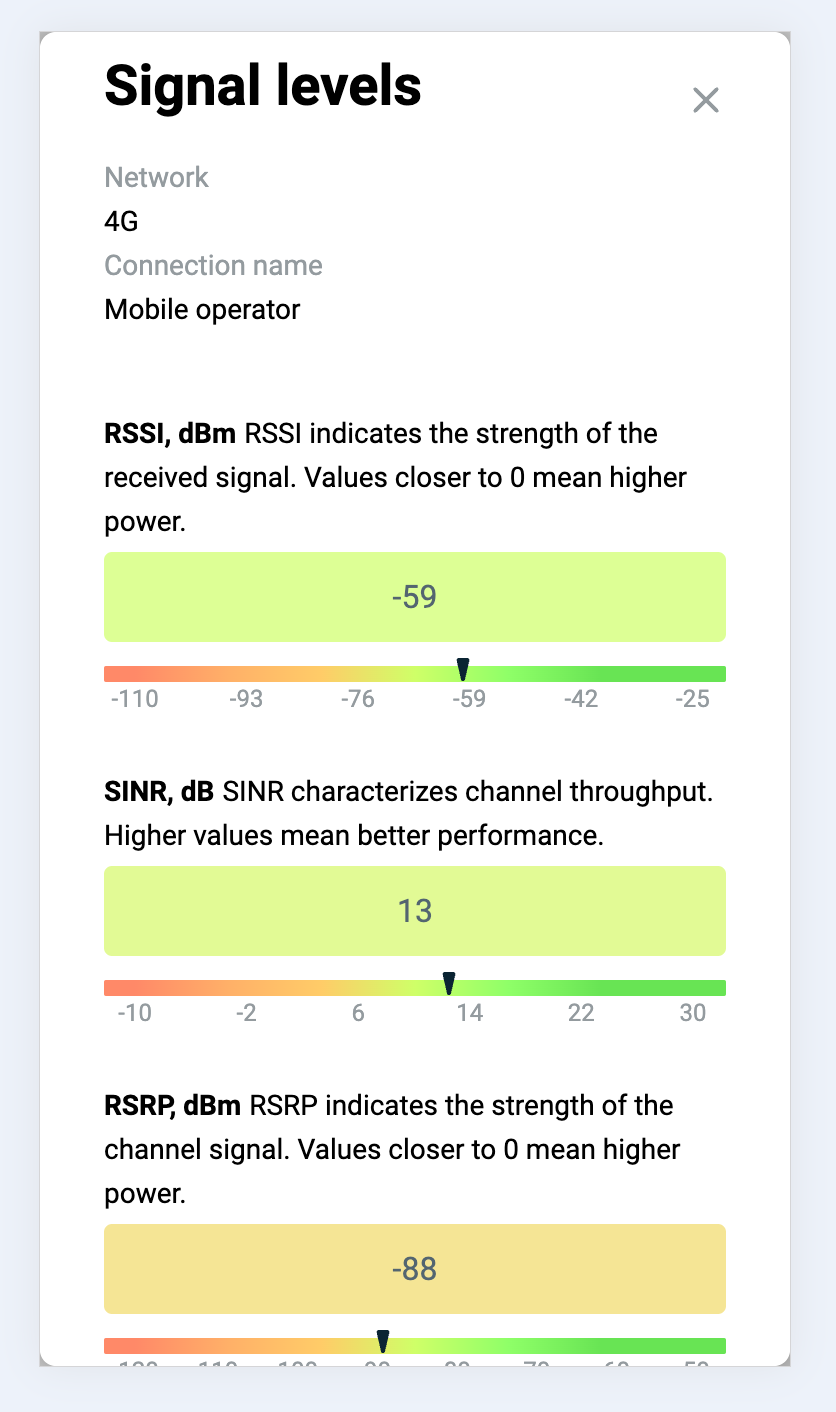
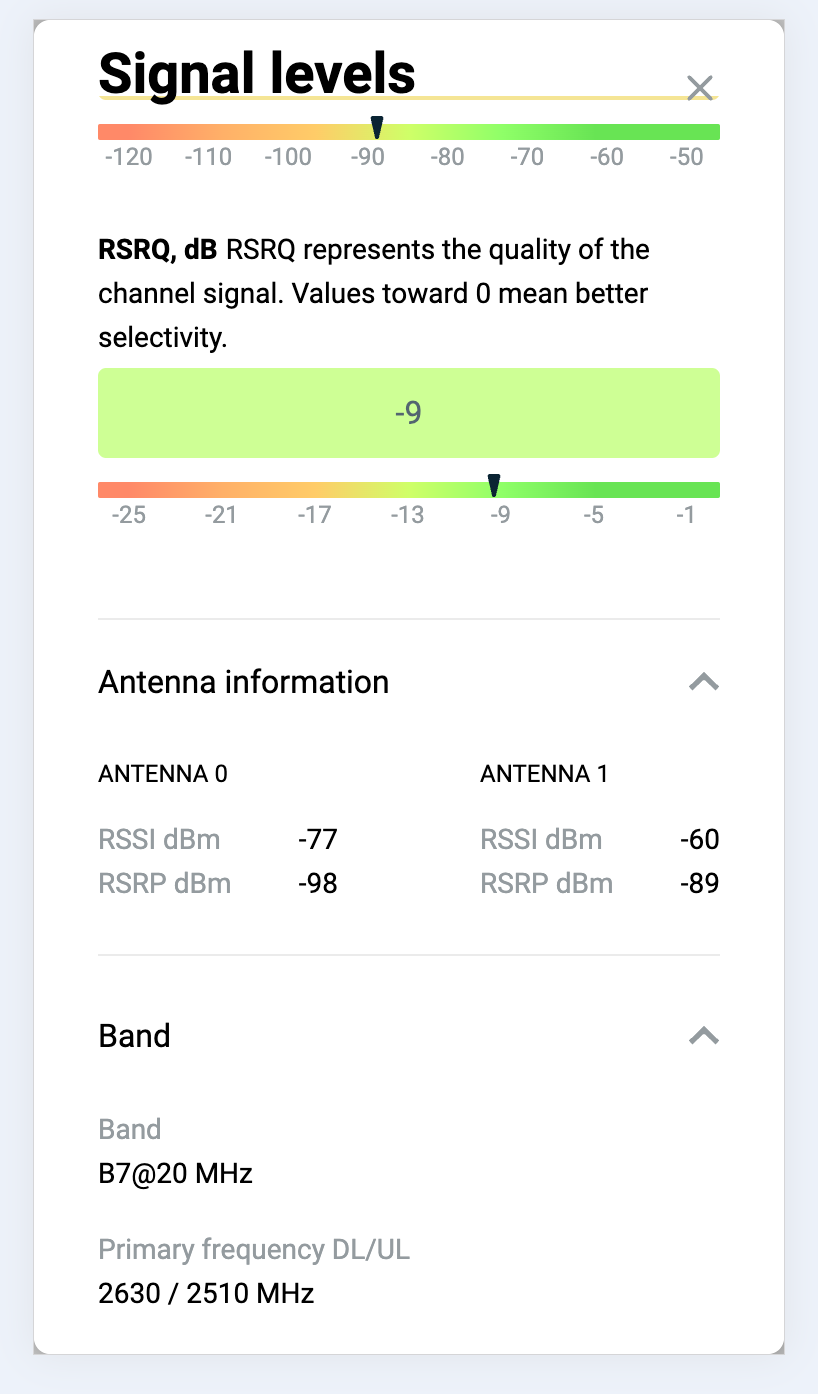
How can I see the signal levels instantly on the mobile app?
eralde replied to bkanatd's question in Feature requests
You can check the signal levels in the device web UI. It works in a mobile browser. To access the web UI you can use http://my.keenetic.net while your phone is connected to Wi-Fi or a KeenDNS name you chose. The signal levels dialog will look like that: And it has a block with info about antennas: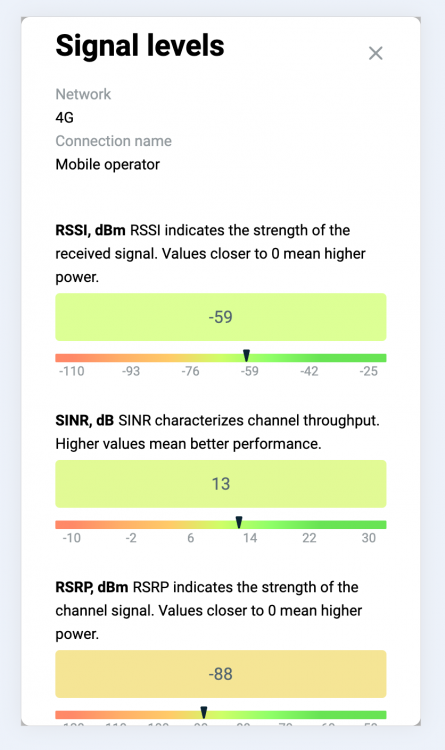
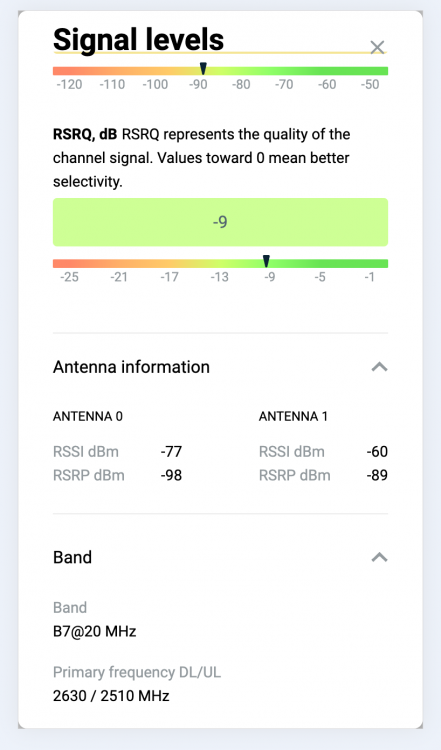
-
4.3.A9 - System settings problem
eralde replied to ru.celebi's question in Dev channel issues & test reports
@ru.celebi @PriSonerS61 thank you for the report! We will fix this issue in one of the next Dev versions of the firmware. -
Mesh Device Configuration Issues After 4.3 Alpha 6 Update
eralde replied to ru.celebi's question in Web interface
Please check if 4.3 Alpha 6.1 solves this problem. -
Mesh Device Configuration Issues After 4.3 Alpha 6 Update
eralde replied to ru.celebi's question in Web interface
Thank you for the report, that is a bug in Alpha 6. It will be fixed in a future version. That is not a bug. Extender settings that are configured by the controller are locked in the extender web UI. However, at the moment some Wi-Fi parameters are still configurable only via the extender web UI, you can see them if you click on the “Advanced Settings” link in your screenshot. Basic Wi-Fi settings on the extender (SSID / Network protection / Password / ...) in both bands are synchronized with the controller. This is part of the Mesh Wi-Fi system design. -
Thank you for the report! This issue was already reported here: It will be fixed in one of the next Dev builds.
-
4.3A4 - Keenetic apps are invisible in the Mobile APP
eralde replied to Knock's question in Web interface
Ah, ok, you already created on there as well -
4.3A4 - Keenetic apps are invisible in the Mobile APP
eralde replied to Knock's question in Web interface
Hello, Alex! That actually looks like an issue in the mobile app. There is no "hide KeeneticOS app in the mobile app" setting that the web UI can toggle. I'll move this thread to the section of the forum dedicated to the mobile app. -
4.3A4 - Incorrect speed units on Dashboard
eralde replied to ru.celebi's question in Dev channel issues & test reports
Hello, I'll pass your request on to the translators -
4.3A4 - Incorrect speed units on Dashboard
eralde replied to ru.celebi's question in Dev channel issues & test reports
Thank you for the report! We know about this issue and will fix it in the next Dev version of the firmware. -
“dsl.bridge-mode-notice” error on the DSL tab
eralde replied to Peganeo's question in Dev channel issues & test reports
Both the missing text and the fact that it appears on devices with an internal DSL modem will be fixed in Alpha 4. -
“dsl.bridge-mode-notice” error on the DSL tab
eralde replied to Peganeo's question in Dev channel issues & test reports
@Peganeo thanks, we'll check it out. I've hidden your message, so that only moderators can see it. -
“dsl.bridge-mode-notice” error on the DSL tab
eralde replied to Peganeo's question in Dev channel issues & test reports
Please attach the self-test file in a hidden message here. The self-test file can be downloaded on the Diagnostics page. -
IntelliQoS Page (Smart Queue Management) - A few feature requests
eralde replied to PriSonerS61's question in Web interface
This is certainly out of scope of this thread (your questions aren't about the Web UI, if I understand them correctly). Please, start a new thread here: https://forum.keenetic.com/forum/52-dev-channel-issues-test-reports/ and describe your issues as detailed as possible or create a new request to the tech support (https://help.keenetic.com/hc/en-us) -
IntelliQoS Page (Smart Queue Management) - A few feature requests
eralde replied to PriSonerS61's question in Web interface
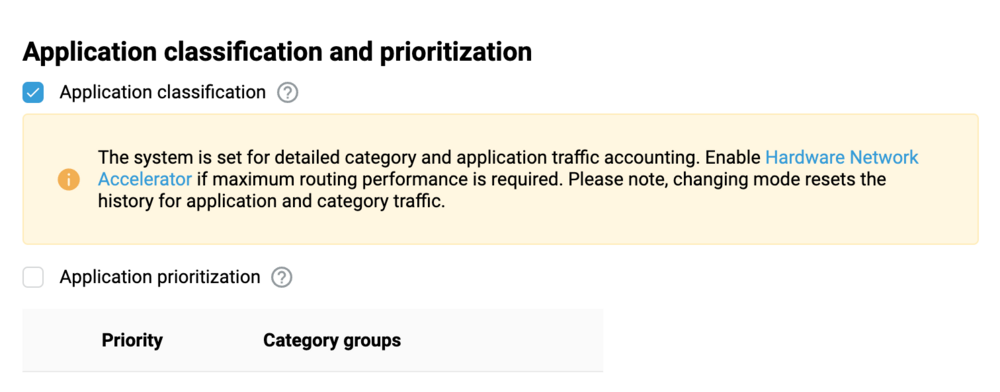
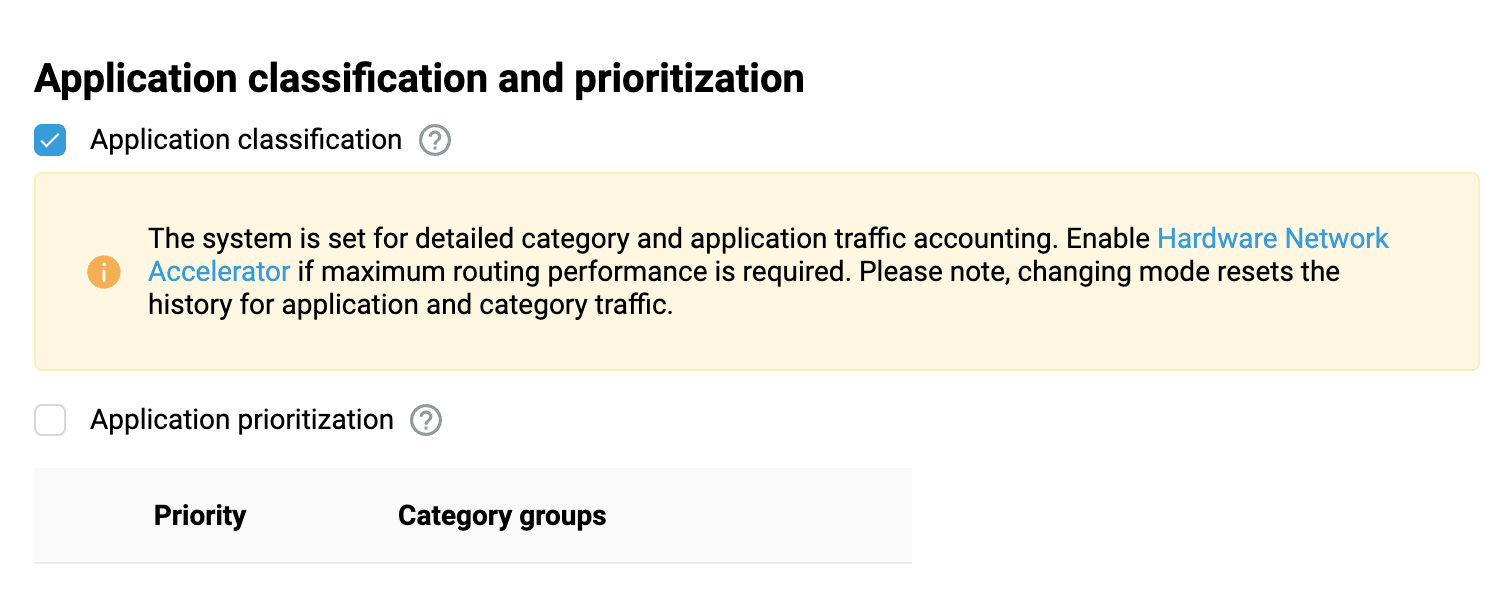
The "IntelliQoS" page layout may be a bit confusing, but the "Application prioritization" checkbox actually turns SQM on or off. In order to properly prioritize traffic, we need to: know the actual bandwidth (how many packets you can send per second over a given connection) classify traffic (put packets of a given type into appropriate queues) send a certain number of packets from each queue according to its priority So that's what we show in the new UI: a table to specify the bandwidth limit for each connection, a checkbox to enable classification and another checkbox to enable prioritization (with a list of traffic types that can be ordered according to your wishes below). -
IntelliQoS Page (Smart Queue Management) - A few feature requests
eralde replied to PriSonerS61's question in Web interface
To disable traffic prioritization you should uncheck the second checkbox on the picture below (it does the same thing as the toggle in the current UI) Personally, I don't think specifying a kbps limit is a very popular feature, but if it gets a lot of votes, we'll probably implement it. Perhaps an easier way to achieve the same result would be to modify the inputs to allow you to enter a non-integer value (in Mbps) there.